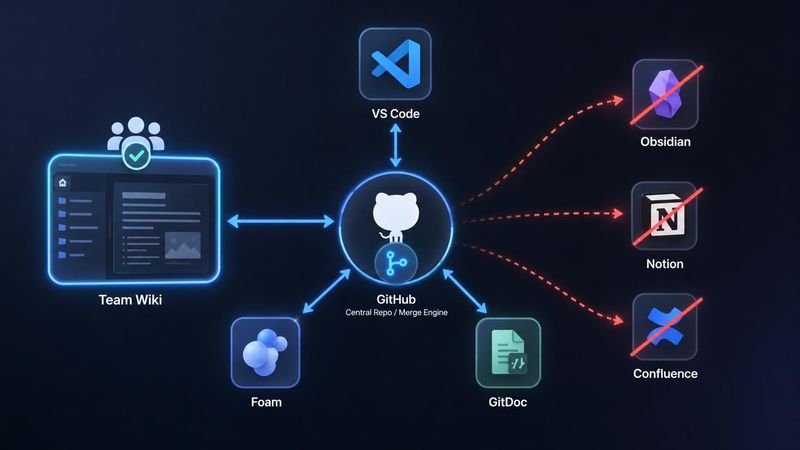
Replacing Team Wikis with VS Code, Foam and Git
Strip a team wiki down to what it actually does and the list is short: it stores interlinked documents, keeps their history, lets people find things, and decides who may read or change what.
Confluence, Notion and Obsidian all deliver that list by putting your documents inside a system — a database, a proprietary document format, an API you have to ask permission to use. The content goes in; getting it back out is a feature the vendor grants you.
The alternative is to keep the documents as what they already are: markdown files, in a Git repository, opened in the editor your team already has running. Everything a wiki does then falls out of tooling that exists anyway. And one capability appears that the hosted products structurally cannot match — an AI agent can read, traverse, summarise and extend the whole thing without an integration, because it's just files.
That it also costs nothing per seat is a side effect, not the argument.
100% markdown, and that is the whole point
There is no storage layer. A note is a .md file on disk. A link is [[another-note]] inside it. The wiki is the folder.
Everything else follows from that one property:
- Nothing to export. Migration off a hosted wiki means an export button and a lossy conversion — mangled tables, broken internal links, attachments that lost their names. Here there is no export path because there was never an import. The files are the content, in the same format on disk, in the repo, and in the published site.
- Every text tool works.
grep,sed, a Python script, a CI job, a static site generator, a diff viewer. None of them need to know anything about your wiki. - The diff is readable. A changed sentence shows up as a changed sentence, not as a mutation of a JSON block tree.
- No renderer lock-in. Markdown renders in VS Code, on GitHub, in
Eleventy,MkDocs,DocusaurusandQuartz, and in every LLM's context window without a converter in between.
Compare with what the proprietary systems store. Confluence pages come out of the API as an XHTML-ish storage format or as ADF — the Atlassian Document Format, a JSON document tree. Notion pages come out as arrays of block objects, paginated, capped at a thousand blocks per payload, behind an average of three requests per second per connection. Both are perfectly good formats for the vendor. Neither is something you or a script or a model can just read.
The wiki layer: Foam plus what VS Code already does
Foam is a free, open-source extension that turns a folder of markdown into a wiki:
- Autocompletion inside
[[, across every note in the workspace. - Backlinks panel — every note pointing at the one you're reading, with the surrounding sentence as context.
- Placeholders.
[[rate-limits]]with no file behind it is a valid link to a note that doesn't exist yet. Click it and the file is created. That is how a wiki is supposed to grow: you write the link the moment you think of it, not when you have time to write the page. - Rename-safe links. Rename or move a note and Foam rewrites every
[[wikilink]]pointing at it, across the whole workspace. On by default, switchable viafoam.links.sync.enable. This is the single feature that makes a link-based wiki survive contact with reality — without it, reorganising a folder silently breaks a hundred links. - Orphans and placeholders panel. Orphans are notes with no inbound or outbound links; placeholders are links with nothing behind them. Both get their own view, which is how you keep the graph from quietly rotting.
- Graph view (
Foam: Show Graph), daily notes, templates, tag explorer, note embedding.
Worth being precise about who does what: VS Code's own markdown support — link validation, updating links on file move, Find All References — only understands standard [text](path) links and heading fragments. It does not know [[wikilinks]] exist. Everything wiki-shaped in the list above is Foam. What VS Code contributes for free is the syntax-agnostic half: split preview, Ctrl+Shift+O for headings in a file, Ctrl+T for headings across the workspace, and the search described below.
Fully team-capable, because Git is the collaboration model
The reflex objection is that this is a personal-notes setup that falls apart with twenty people in it. It's the opposite: Git is the most battle-tested concurrent-editing system in the industry, and a wiki is a far easier workload for it than source code.
| Wiki feature | Git equivalent |
|---|---|
| Page history | git log -p --follow note.md, or the VS Code Timeline view |
| Who wrote this sentence | git blame |
| Restore an old version | git checkout <sha> -- note.md |
| Draft vs. published | a branch |
| Review before publish | a pull request |
| Access control | repository permissions |
| Section ownership | CODEOWNERS |
| Offline access | the working copy — the whole wiki is on every laptop |
Two of these beat the hosted equivalent rather than merely matching it.
Two-speed editing. Most hosted wikis are all-or-nothing: either every edit is live instantly or every edit needs approval. Git gives you both in one repo. Meeting notes and scratch pages commit straight to main. The architecture decision record and the on-call runbook sit behind CODEOWNERS and need a pull request. Same tool, different rigour, chosen per directory.
Full history, for free, forever. Not a "page versions" panel that keeps the last N revisions and shows you a rendered before/after. Line-level authorship on every sentence, going back to the first commit, queryable from the command line.
Make it feel like a wiki, not like a repository
Nobody writing meeting notes should have to think about staging and pushing. They don't have to. GitDoc commits on save and pushes for you:
// .vscode/settings.json — in the wiki repo, and only there
{
  "gitdoc.enabled": true,
  "gitdoc.autoCommitDelay": 1000,
  "gitdoc.commitValidationLevel": "none",
  "gitdoc.autoPush": "onCommit",
  "gitdoc.autoPull": "onPush"
}
Writing a note becomes: open file, type, Ctrl+S. Commit, push and pull happen underneath. Someone who never learns a single Git command still gets complete version history on everything they write.
Two caveats, both real:
- The history gets noisy. Hundreds of one-line commits a week, most meaningless in isolation. For prose that's fine — you never bisect a wiki — and
git log --followon a single file still reads cleanly. GitDoc can squash a session if it bothers you. - Never enable this on a code repository. Auto-committing half-finished code on every keystroke pause is exactly as bad as it sounds. Ship the setting in the wiki repo's workspace settings, never in your user settings.
That also argues for the wiki living in its own repository rather than a docs/ folder inside the product repo: separate permissions, separate history, no interaction with your CI, no chance of the auto-commit setting leaking into code.
Review and comments: CriticMarkup
Pull requests are a good gate and a bad review surface for prose. A GitHub review comment attaches to a line number in a diff, which is the wrong granularity for text — you want to propose this wording instead of that wording, in place, the way Google Docs suggestions and Overleaf's track-changes work.
CriticMarkup is that, as a plain-text convention. Five operations, all of them legal markdown that no parser chokes on:
The import job retries {--three--}{++five++} times before alerting.

{~~nightly~>hourly~~} runs are covered by [[oncall-runbook]].

{==This paragraph needs a source.==}{>>@thomas — do we have the benchmark?<<}

{++A new sentence a reviewer is proposing.++}
{++ ++} inserts, {-- --} deletes, {~~old~>new~~} substitutes, {== ==} highlights, {>> <<} comments. That's the entire specification.
Because the markup is text, everything else already works: suggestions live inside the file, travel through Git like any other change, show up in a normal diff, survive being opened in any editor, and are readable by anything that can read the page — including an agent, which can both act on comments and leave its own.
In VS Code there are two extensions worth knowing, and the difference matters:
- CriticMarkup (jloow) — syntax highlighting, snippets, keybindings for each operation (
Ctrl+Shift+Aaddition,Ctrl+Shift+Ddeletion,Ctrl+Shift+Ccomment, …) andCriticMarkup: Next Change/Previous Changeto cycle through a document. Be aware it's archived and does not implement accept/reject — you resolve marks by hand. - Editmarks / scimax-vscode (jkitchin) — a track-changes system that reads CriticMarkup syntax alongside its own, and does implement accepting and rejecting marks individually or all at once. This is the one to use if you want the Google-Docs resolve loop rather than manual cleanup.
The workflow that falls out:
- Reviewer branches, marks the page up with suggestions and comments, opens a pull request.
- Author cycles through the changes in the editor and accepts or rejects each one.
- Resolving a mark deletes it, so the merged page is clean markdown again — no residue, no separate comment store.
- The review itself is a commit. Six months later
git log -pstill shows what was questioned and what was decided, which is more than the comment sidebar of a hosted wiki preserves after someone clicks Resolve.
Two things worth wiring up. Your static site generator can render the marks instead of hiding them: pymdownx.critic has view, accept and reject modes, so an internal preview build can show every open suggestion in context while the published build renders the accepted text. And a two-line CI check that fails when a {++, {-- or {>> reaches main guarantees no page ever ships with an unresolved suggestion baked into it.
What this gets you is the Overleaf/Google-Docs review affordance — inline suggestions, inline comments, accept/reject — without leaving plain files. What it doesn't get you is real-time: two reviewers marking up the same paragraph simultaneously is still a merge, not a live cursor.
Search is ripgrep
Workspace search in VS Code is ripgrep. On tens of thousands of notes it returns results as fast as you can type, with regular expressions, case sensitivity, whole-word matching and include/exclude globs — so "the word retry anywhere under runbooks/ but not in archive/" is a query you can actually express.
No index to build, no search service to keep healthy, no gap between saving a page and finding it. Hosted wikis put an indexing pipeline between those two moments, which is why the page you wrote a minute ago sometimes isn't findable yet.
The one that actually changes the calculus: agents
This is where the gap stops being about convenience.
A wiki in a Git repo is a folder of plain text in the working directory. That means any coding agent — Claude Code, Copilot, Cursor, a script of your own around an API — already has full-fidelity read and write access to the entire knowledge base. No connector. No OAuth app. No API client. No pagination. No rate limit. No format conversion. The tools an agent already has — read a file, grep the workspace, write a file — are exactly the tools a wiki needs.
What that unlocks, concretely:
- Ask questions across the whole wiki. "Which runbooks still reference the old queue name?" is a
grepthe agent runs itself, followed by it reading the ten hits in full. It doesn't sample a search index; it reads the documents. - Extraction and summarisation on real content. The agent sees the actual markdown, headings and all, not a rendered HTML approximation or a truncated block tree. Cross-document summaries — "condense everything we've written about the migration into one page" — work because it can read everything, not the first hundred blocks of each page.
- Agents that write pages. This is the part people underestimate. Turning a debugging session, an incident, or a design discussion into a properly linked wiki page is a file write. The agent creates
notes/incident-2026-08-03.md, writes the frontmatter, adds[[oncall-runbook]]links to the pages it referenced — and Foam picks up the backlinks instantly, because there is nothing to sync. - Every agent edit is reviewable. The write lands as a Git diff. You read it like any other diff,
git blameshows which commit an agent authored, and a bad page is onegit revertaway. Compare with an agent writing through a wiki API: an opaque mutation, no diff, no attribution, no clean undo. - Maintenance jobs that were never worth building. A scheduled agent that finds pages contradicting each other, flags runbooks nobody touched in a year, drafts the missing page behind every long-lived
[[placeholder]], or proposes links between notes that clearly belong together. Each of those is a small script plus a pull request, because the corpus is files and the output channel is a branch.
The general point: an LLM's native input format is text, and markdown is the closest thing to a canonical text format there is. A wiki stored as markdown is already in the representation a model wants. A wiki stored as ADF or Notion blocks has to be fetched over a rate-limited API, converted, and truncated before a model sees it — and the conversion is lossy in exactly the places that carry structure. If you expect agents to be serious participants in your team's knowledge base, the storage format stops being an implementation detail and becomes the deciding feature.
You can extend it yourself
A hosted wiki's navigation is its folder tree, and a folder tree expresses exactly one hierarchy: every page has one parent and sits in exactly one place.
Real notes don't behave like that. Take a page documenting how your API rate limiting works. It belongs under API Design, because that's where someone building a new endpoint goes looking. It belongs under Incident Response, because it's the first page you open when customers start reporting HTTP 429s. And it belongs under Onboarding, because every new backend developer needs it in their first week. A folder tree forces you to pick one of the three — and from the other two, the page effectively doesn't exist.
The link graph already knows all three relationships. Pages in each of those areas link to [[rate-limiting]]; that is the statement "this note belongs here". The information is sitting in the files. It just isn't rendered anywhere.
In VS Code that's a tree view you can write yourself. The TreeDataProvider API is small enough to show in full:
export class LinkTreeProvider implements vscode.TreeDataProvider<Note> {
  constructor(private graph: LinkGraph) {}

  getTreeItem(note: Note): vscode.TreeItem {
    const item = new vscode.TreeItem(
      note.title,
      this.graph.outgoing(note).length > 0
        ? vscode.TreeItemCollapsibleState.Collapsed
        : vscode.TreeItemCollapsibleState.None
    );
    item.command = { command: "vscode.open", title: "Open", arguments: [note.uri] };
    return item;
  }

  // A note's children are the notes it links to.
  // Because every path is rendered, a note reachable three ways
  // appears in all three branches.
  getChildren(note?: Note): Note[] {
    return note ? this.graph.outgoing(note) : this.graph.roots();
  }
}
Register that against a view in package.json, rebuild the graph on a file watcher, and the sidebar shows a structure no folder tree can express. Two details make it usable in practice: compute children lazily per expansion, so a densely linked vault costs nothing until you expand a wide branch, and render a link back onto a note already in the current path as a marked leaf — otherwise the tree is infinite.
The point isn't this particular view. It's that "the navigation doesn't match how we think" is a solvable problem here and a support ticket everywhere else. Same for a CI job that fails on a dead [[link]], a script that files an issue for every stale placeholder, or a nightly tag report. Notes are files; anything that works on files works on your wiki.
Publishing to everyone else
The read-only company-wide view is a static site generator pointed at the same repo. Eleventy, MkDocs, Docusaurus and Quartz all consume a folder of markdown, and all of them resolve [[wikilinks]] natively or with a small plugin. Push to main, the site rebuilds.
One source, two audiences: editors work in VS Code against the repo, everyone else reads a fast static site with no login and no seat.
Mobile Viewing and Editing
One of our use cases is to have the important information available on mobile devices, even offline.
There are good solutions like GitJournal which support exactly that. They clone the respective repo, provide all the files and folders including a markdown preview, and automatically commit and push changes as soon as you click "save".
This way, you have your team brain always with you. And it is still "just markdown".
What you actually give up
Not nothing. Roughly in order of how often it bites:
Real-time collaborative editing. Two people typing in the same paragraph is a merge conflict, not a shared cursor. For documents written by one person and read by many — most wiki pages — this never comes up. For a document a workshop edits together live, Confluence or Notion simply wins.
WYSIWYG for non-technical colleagues. VS Code's split preview is good and markdown is learnable in twenty minutes, but "install an editor and clone a repository" is a real barrier for people whose job isn't software. This is the single biggest reason mixed organisations stay on a hosted wiki.
Structured databases. Notion's tables, views, filters and rollups have no markdown equivalent. If your "wiki" is really a project tracker wearing a wiki costume, this doesn't replace it.
Per-page read permissions. Git permissions are repository-scoped. CODEOWNERS controls who must approve a change to a path; it does not hide that path from anyone who can clone. Genuinely confidential sections need their own repository. If compliance demands per-page read ACLs with an audit trail, buy the product.
Mentions and notifications. CriticMarkup covers inline comments and suggestions, and pull requests cover the review gate — but nobody gets pinged. There's no equivalent of "@ someone in the margin and they get a notification", and no per-page change alert beyond watching the repo, which is coarser.
Binary attachments. Git handles a few screenshots fine and a folder of 40 MB PDFs badly. Git LFS or an external bucket — either way it's a decision you have to make.
When the hosted wiki still wins
- Most writers are non-technical. The barrier is the editor and the repo, not the markdown. If most of the organisation needs hand-holding through both, the seat price is cheaper than the friction.
- Live co-authoring is central. Workshops, collaborative minutes, anything where four cursors in one document is the normal case.
- Compliance requires per-page read control and audit. Repository permissions cannot express this.
- You're deep in Atlassian or Notion already. Confluence pages linking into Jira issues, or a Notion database driving a real workflow, are integrations rather than documents. Replacing the documents doesn't replace those.
Bottom line
For a team that already lives in a Git repository, a wiki isn't a system to adopt — it's a repo, a free extension, and an afternoon of setup. You get the same interlinked pages with better history, faster search, no lock-in, and the ability to fix anything you don't like in TypeScript instead of filing a feature request.
And you get the thing the hosted products can't retrofit: a knowledge base that is already in the format agents read and write natively. As soon as AI agents are expected to answer from, maintain, and extend a team's documentation, "it's all just markdown in Git" stops being a purist's preference and becomes the architecture.
Takeaways
- One markdown file per note,
[[wikilinks]]between them, in one dedicated Git repo — separate from your code. - Foam supplies the wiki layer — wikilinks, backlinks, rename-safe links, orphan and placeholder tracking. VS Code adds
ripgrepsearch and heading navigation on top; its built-in link validation does not cover[[wikilinks]]. - GitDoc hides Git completely from people who don't want it — but only in the wiki repo's workspace settings.
- Use branches and
CODEOWNERSselectively: instant commits for notes, pull requests for the pages that matter. - CriticMarkup gives you Google-Docs-style inline suggestions and comments in plain text — with an accept/reject loop in the editor and a CI check so no unresolved mark ever ships.
- Agents are first-class contributors — reading, summarising and writing pages as files, with every edit landing as a reviewable diff.
- Publish a static site from the same repo for everyone who only reads.
- Be honest about the three real gaps: live co-editing, WYSIWYG, per-page read ACLs.
Sources:
- Foam — VS Code Marketplace
- GitDoc — VS Code Marketplace
- CriticMarkup — syntax specification
- CriticMarkup for VS Code (jloow) — Marketplace
- Editmarks / scimax-vscode (jkitchin) — track changes with accept/reject
pymdownx.critic— view / accept / reject rendering modes- Markdown editing in VS Code
- VS Code Tree View API
CODEOWNERS— GitHub Docs- Confluence Cloud REST API v2 — Atlassian
- Atlassian Document Format (ADF)
- Notion API request limits